Gebrüder Weiss transports street lighting to Mongolia
25. November 2021
Prof. Dr.-Ing. Robert Schulz Joins Jury of LogiMAT “BEST PRODUCT”
25. November 2021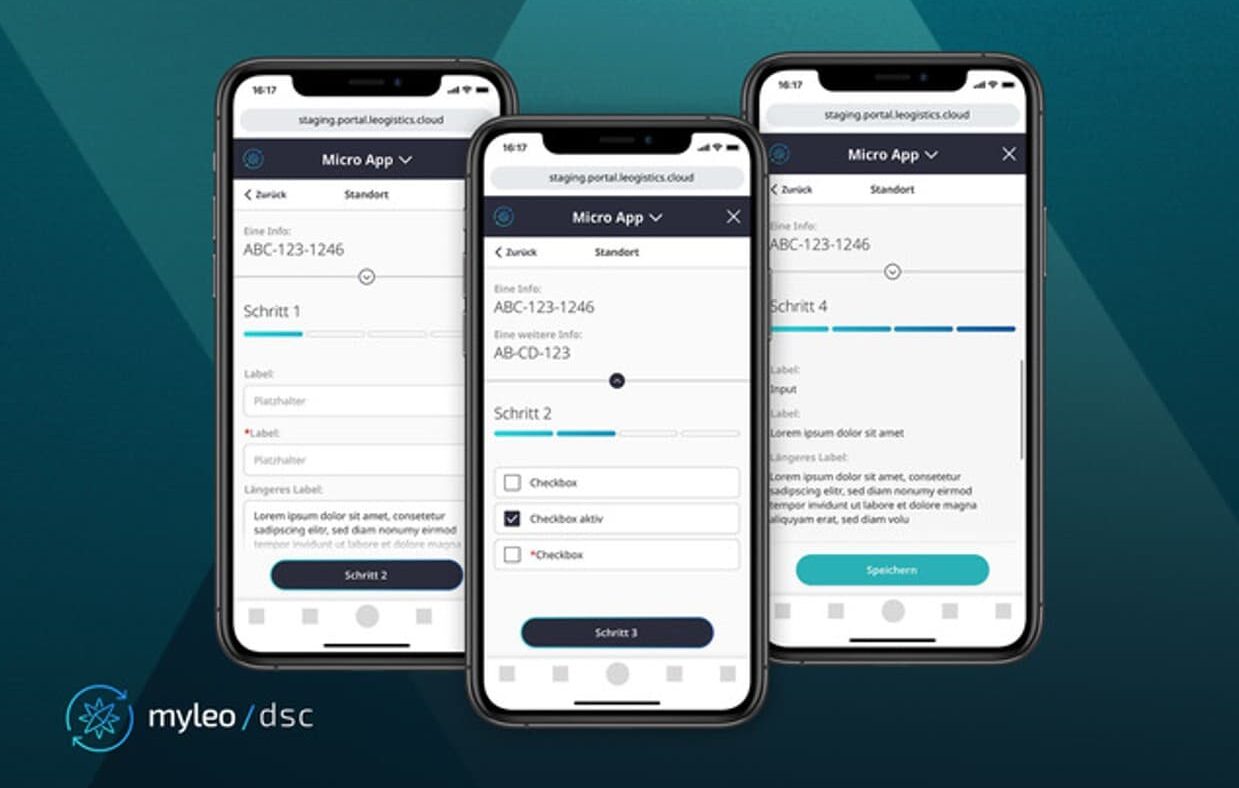
The Hamburg-based leogistics GmbH, a leading driver of the future of supply chain management, presents the latest innovation of the logistics platform myleo / dsc with its No-Code editor for micro-apps. With this toolkit, companies can create applications for truck drivers, including check-in, loading, or goods dispatch, with just a few clicks and without any programming knowledge.
(Hamburg) Ready-made apps are immediately applicable and integrated into the processes represented by myleo / dsc. This platform makes a significant contribution to the simplest digitization of logistics processes. Time-consuming, paper-heavy, and error-prone manual documentation, such as for load securing, is thus eliminated.
Digitizing logistics processes is now a fixed component in the portfolio of consulting firms and IT solution providers. Increasingly, there is a desire for smaller, quickly realizable measures to enhance efficiency and minimize manual process efforts. Through digitization in the form of tailored apps, companies can achieve greater transparency over relevant information, noticeably improve their performance, and reduce costs. Captured images and signatures are immediately available in the system and are directly accessible as part of the platform.
Using Smart Apps for Paperless Logistics
“The vision of myleo / dsc is to become the simplest, most efficient, and future-proof supply chain execution platform. With the app editor based on no-code technology, we offer our customers the opportunity to develop apps cost-effectively and without programming knowledge themselves – bringing us a significant step closer to our goal,” says André Käber, CEO of leogistics GmbH.
With micro-apps, many manual logistics processes, such as terminal check-ins, safety checklists, and more, can be flexibly configured, digitized, and easily integrated. In myleo / dsc, this is now straightforward with a no-code editor. No- or low-code refers to a technology that allows users to create their own software applications without programming knowledge. This enables companies to represent any requirements in the shortest possible time, integrate them into the cloud solution, and offer them on mobile devices such as smartphones, tablets, laptops, or dedicated terminals.
Diverse Applications for Micro-Apps
Especially in yard management, leogistics covers a wide range of areas with the no-code editor, from truck check-ins to goods dispatch.
For example, all terminal check-in processes can be flexibly configured and integrated as micro-apps that represent specific elements of the process chain, like building blocks in larger apps. A simple check-in could look like this: “Input transport reference, input truck license plate, input driver name – check-in completed.” More complex processes, such as those for chemical loading, can also be easily represented. Here, companies can use the app to query a transport reference, driver information such as a mobile number, license plate, and tank capacity of the truck. The display of the net weight can also be integrated by connecting a truck scale for parallel empty weighing during check-in. A next step in the app could be a safety briefing using a checklist: ADR check completed, protective equipment complete, site safety briefing understood, etc. After the signature, a completion screen displaying the next location would appear.
App “Digital Goods Dispatch”
Another app in practical use is the “Digital Goods Dispatch.” Here, a transport document is generated in SAP ERP and transmitted to myleo / dsc via an interface. The driver has access to it via the app and can select the transport document based on a reference number. After the loading process, the user confirms its completeness, documents the load securing in the app, and signs digitally. The transport document, including the signature and images, is then transmitted to SAP ERP. The advantage: No paper or scanning processes are needed, and there is only a “single source of truth.”
Develop dsc in Minutes
When creating the app in the myleo / dsc editor, customers can add a custom number of required screens to their app. On each of these individual screens, it is possible to define displayed texts, place input fields via drag & drop, and capture relevant information. A wide selection of various fields is available, for example, for validating phone numbers, checkboxes, dropdown menus, or a scanning function.
Finally, a freely configurable completion screen displays information such as driving instructions. After creation, it can be checked via the app preview, including device selection (e.g., smartphone/tablet) and screen orientation (portrait/landscape), whether everything works. Furthermore, the finished apps can be translated into numerous languages.
Photo: © leogistics